Table QR Ordering Works Best With a Human Backup
Phone-based ordering can shorten waits for straightforward purchases, but operators should retain assistance and test the full path from scan to service recovery.
By Priya Nair, Senior Writer · · 6 min read
This is practical analysis. Examples are illustrative composites, not reports on specific restaurants.
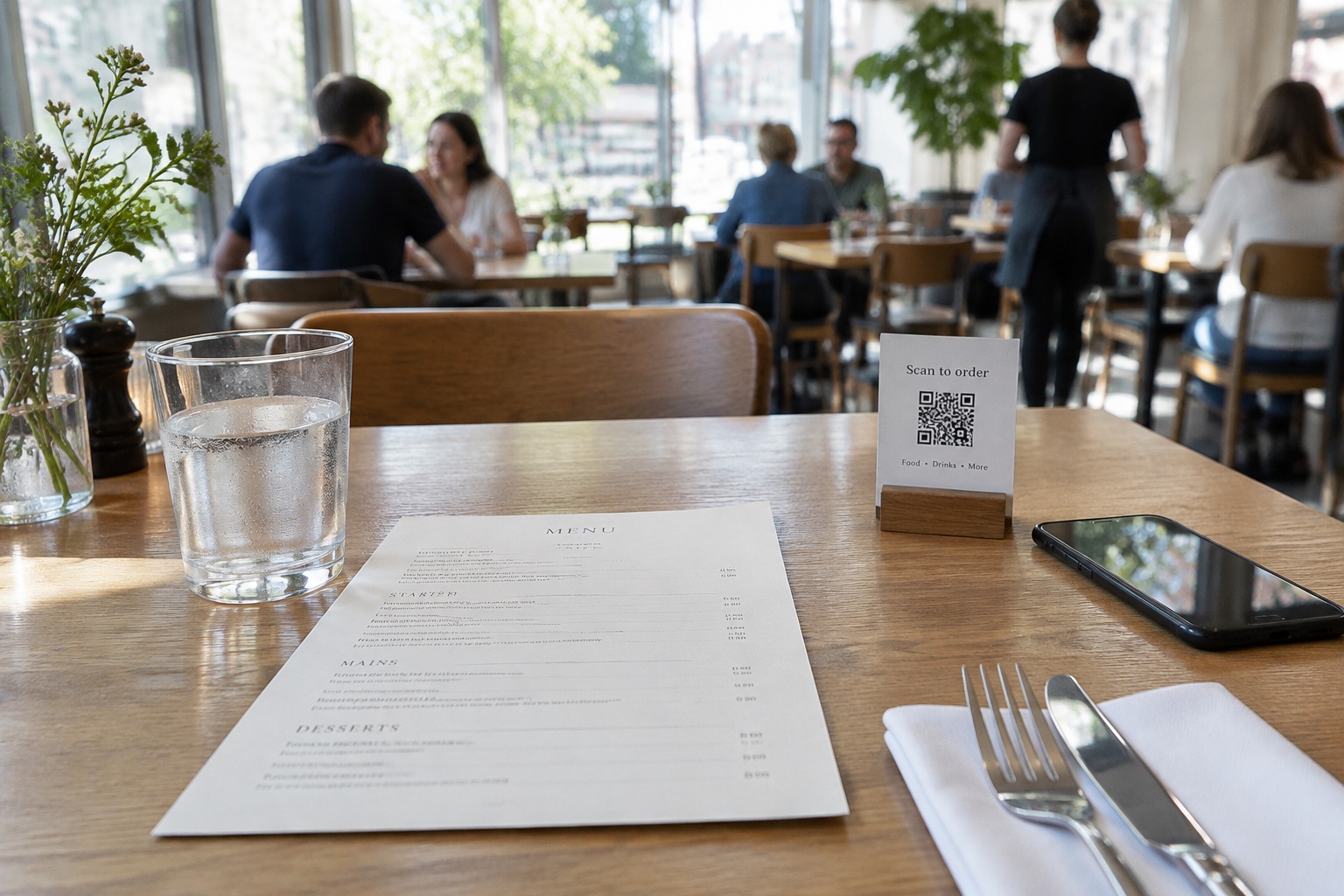
A QR code on a table can remove the wait to place a second drink order. It can also replace a simple request with a dead battery, a confusing modifier screen or an unexpected account-registration step. The difference depends on the guest occasion and the ordering design, not on the code itself. Operators evaluating table ordering should identify a narrow service problem first. Then they should test whether phone ordering removes that friction without transferring too much work to guests or leaving employees uncertain about who is monitoring the table.
An illustrative taproom with a compact food menu may benefit when guests can reorder from their seats rather than queue at the bar. A restaurant built around guided wine choices and paced courses faces a different calculation. Even within one dining room, QR ordering may suit an additional beverage better than an initial meal order with allergy questions. The useful decision is therefore not simply whether to adopt the technology. It is which transactions belong on the phone, which require conversation and how guests move between the two.
Test the whole order, not the scan
Begin with an unfamiliar phone on the connection a guest would actually use. Check whether scanning opens a readable menu promptly, whether prices and required charges appear clearly and whether ordering requires an app download or account. Try small screens, larger text settings and common accessibility features. Test the complete path through payment and confirmation, including a declined card. A fast scan means little if the guest spends several minutes navigating a cart or cannot determine whether the order reached the kitchen.
Table identity is another practical vulnerability. Decide how the system verifies location and what happens when guests move seats, combine tables or place orders for someone elsewhere. Make table numbers visible and easy for runners to confirm without asking every party what they bought. Test repeat ordering after a tab is closed and identify how duplicate taps or uncertain confirmations are handled. A restaurant should know how to find the order, refund an error and explain the result without sending the guest to an outside support queue.
- Offer a clearly identified assisted-ordering option.
- Show prices, modifiers and applicable charges before payment.
- Verify table assignment and order confirmation.
- Provide a direct route for allergy and service questions.
- Test refunds, duplicate orders and unsuccessful payments.
Keep hospitality responsibilities explicit
Phone ordering does not eliminate dining-room ownership. Assign someone to notice guests who have not ordered, check missing items and handle questions. Without that responsibility, employees may assume the app is managing a table while guests assume someone will eventually stop by. Define how quickly staff should approach a party that appears stuck, and make assistance easy to request without another scan. A printed menu and a working alternative ordering method should be available, with staff trained to offer them naturally rather than as an exception.
Allergy communication needs special attention. A free-text field is not a substitute for a clear process connecting the guest, an informed employee and the kitchen. Explain where guests should seek help and ensure that relevant information appears reliably in production. Do not let a digital menu imply that every requested modification can be accommodated safely. Review descriptions and ordering options with the culinary team, and keep them current when ingredients change. Where the system cannot support the restaurant’s safety procedure, route that transaction to an employee instead.
Second orders can create fragmented service if the kitchen and runners receive separate tickets without enough context. Test whether an added side should join an existing meal or arrive independently, and make expectations clear to the guest. Establish who responds when one person’s order arrives much earlier than another’s. For restaurants promising coordinated courses, individual phone checkout may be a poor fit unless the platform and staff process support table-level pacing. The guest should not need to understand the software’s ticket structure to receive a coherent meal.
Measure the labor and revenue effects
A useful pilot compares order-placement delays, completed transactions, refunds, service requests and contribution per guest or occupied seat-hour. Track paid labor by role rather than assuming every phone order removes employee time. Cashier work may decline while running, troubleshooting and clearing remain unchanged. In an illustrative operation, saving six ordering hours while adding four support hours produces only two hours of potential schedule reduction, and even that depends on coverage needs. The software bill and transaction-related charges must also enter the comparison.
Guest data and payment practices deserve a separate review. Determine what information is required to complete an order, what is optional and how marketing permission is requested. Review vendor responsibilities, data access, payment-security obligations and retention practices with appropriate advisers. Physical codes also need routine inspection so staff can spot damaged or replaced labels. Train employees to report suspicious changes and know the approved ordering address. Security and privacy should not be reduced to a reassuring logo at checkout or a promise buried in vendor sales material.
Set a decision rule before expanding. The operator might keep QR ordering for reorders and patio service while retaining employee-led first orders inside. Another restaurant may find that optional phone ordering works well across the room, provided assistance remains visible. Neither outcome is a technological compromise; both match the tool to the occasion. The durable test is whether guests can order correctly, understand what they will pay and obtain help when needed. If the phone makes those tasks harder, the restaurant has moved the queue rather than removed it.
Operator checklist
- Choose the transactions and service areas where phone ordering solves a problem.
- Test ordering, payment and confirmation on unfamiliar devices.
- Maintain visible assisted ordering and an allergy communication process.
- Assign table monitoring, running and recovery responsibilities.
- Evaluate labor, fees, contribution and guest friction before expanding.
- Inspect physical codes and review data and payment responsibilities.
Spot an error? Request a correction. Read our editorial standards.
More from Foodservice Journal
Before a POS Switch, Price Three Years—Not One Demo
A useful POS comparison includes payment processing, integrations, installation, exit costs and the labor required to move the restaurant.
Technology · Priya Nair · September 22, 2026
Kitchen Displays Pay Off Only When Ticket Rules Are Clear
Replacing paper with screens can improve order visibility, but routing, timing and recovery procedures determine whether the kitchen benefits.
Technology · Priya Nair · September 8, 2026
A Shorter Menu Only Pays When the Prep List Shrinks
Cutting dishes can simplify service, but the larger savings come from eliminating ingredients, prep tasks and purchasing exceptions.
Restaurant Trends · Grace Whitfield · November 24, 2026